Friday, July 16, 2021

CBSE CLASS 10 MATHS TEST, SAMPLE PAPERS DOWNLOAD


CBSE Sample Papers for Class 10

CBSE Sample Papers for Class 10 releases every year by the Central Board of Secondary Education (CBSE) on the board’s website. With the aim of giving an overview of the actual exam pattern, CBSE officially publishes the CBSE Sample Paper Class 10 for all subjects. Also, the marking scheme and answer key for each paper is made available. The sample papers are designed as per the revised syllabus. For the academic year 2020-21, the board has reduced the CBSE Class 10 Syllabus by 30% due to the widespread of Coronavirus disease. So, the CBSE Paper Class 10 2020-21 are based on the revised syllabus. The sample question papers are a helpful resource for CBSE Class 10 students. They must practise all the CBSE sample papers and should not leave any stone unturned for their board exam preparation.

Students must practice the questions from the sample papers provided here. After solving these CBSE Class 10 Sample Papers, students will become capable enough to tackle tough questions in the exam. Doing so will boost students confidence level and provide them good practice. Students can have a look at the questions asked in the exam for all major subjects by going through the CBSE Class 10 Previous Year Question Papers. This will help students in understanding the difficulty level of the exam.

CBSE Sample Papers for Class 10 – All Subjects

Apart from the official Sample Papers, we have provided a few more papers for students’ practice. Students can access the CBSE class 10 sample papers for all the subjects from the links provided in the table below. We have also provided the CBSE 10th Sample Papers for SA1 and SA2.

Access CBSE Sample Papers for Class 10 below:-

Download Year Wise CBSE Sample Papers for Class 10

Every student studies hard throughout the year to score high marks in CBSE Class 10 board exams. Preparation is a very crucial part of CBSE Class 10 students. The final result depends upon their preparation. So, to help them prepare in a better way, we have provided the Previous Years’ CBSE sample papers for Class 10. Students can download these CBSE Paper Class 10 in PDF format. Solving CBSE Class 10 Sample paper will give students an idea about the question paper pattern, frequently asked questions and on which topics to emphasise more in a subject. CBSE 10th Sample Papers will boost their confidence level, and they will feel optimistic towards the board exams.

Click on the link below to access the year-wise CBSE Sample Paper for Class 10.

CBSE 10 Sample Paper for the Academic Year 2021

CBSE 10 Sample Paper for the Academic Year 2020

CBSE 10 Sample Paper for the Academic Year 2019

CBSE 10 Sample Paper for the Academic Year 2018

CBSE 10 Sample Paper for the Academic Year 2017

CBSE 10 Sample Paper for the Academic Year 2016

Here are the year wise sample papers with solutions for all subjects of Class 10. These CBSE 10th Sample Papers are provided by the CBSE board to make students well versed with the question paper pattern. Just click on subjects of your choice and get access to CBSE sample question papers for class 10. Marking scheme is also provided for each sample question paper for class 10 CBSE, which will help students to understand how marks are given by the teachers for each answer. Thus, they will get to know the importance of writing the answers in steps.


Highlights of CBSE 10th Sample Papers

The sample question papers cover the complete CBSE Class 10 Syllabus. The set of sample question paper for class 10 CBSE involves important questions from each chapter along with marks weightage. Here are a few benefits of solving the CBSE Board Sample paper Class 10.

  • Students will get an idea about the actual test paper pattern.
  • Students can understand the Marking Scheme.
  • They get an in-depth analysis of the paper.
  • These sample papers help in evaluating the performance of students.
  • By solving the CBSE board sample papers for class 10, students could able to solve all the questions on time during the exam.

These class 10 sample papers will help in self-evaluation. Students can access their current level of exam preparation. Accordingly, they can prepare for the exam and boost their exam preparation. The answer solution provided will help in knowing the better way of expressing answers in the exam.

We hope students must have found this page on “CBSE Board Sample Papers for Class 10” useful for their exam preparation. Stay tuned for further updates on CBSE and other competitive exams. To get interactive study videos, subscribe to the BYJU’S YouTube channel.

Frequently Asked Questions on CBSE Sample Papers for Class 10

What are CBSE Class 10 Sample Papers?

CBSE Class 10 Sample Papers are the model papers which are made as per the latest syllabus, exam pattern, blueprint, marking scheme and guidelines issued by CBSE every year. These sample question papers resemble the actual question paper pattern.

When does CBSE release the Class 10 Sample Papers?

CBSE usually releases the sample papers in September. This year board has released the class 10 sample paper on 19th September 2019 on the official website.

How many Sample Papers does CBSE release?

CBSE releases one sample paper for each subject following the latest exam pattern. Along with the sample paper, the board also provides the marking scheme.

Does CBSE provide the answer key or solutions of the sample papers?

Yes, CBSE provides the answer key of the sample papers, which is known as the Marking Scheme (MS). It contains the answers to all the questions with step marking.

Are solving the official CBSE Sample Papers enough for scoring good marks in class 10 exam?

CBSE provides only one sample paper for each subject. Just solving one sample paper won’t help in scoring high marks. It is advised to students to solve more sample papers. In this page, we have provided different sets of sample papers along with solutions for students practice.

What is the new pattern of CBSE Class 10 Exam?

CBSE has introduced Objective Type Questions in all subjects of class 10. Also, the board has increased internal choices in the question paper in all sections.

Are CBSE Sample Papers useful for Class 10 Board Exams?

Yes, CBSE Class 10 Sample Papers are very helpful for board exam preparation. By practising the sample papers, students get to know the exam pattern, types of questions asked in the exam and their difficulty level. Sample papers help in analysing the current exam preparation and the areas where students need to focus more to improve their performance.

What is the difference between Basic Level and Standard Level Maths Paper of CBSE Class 10?

Standard-Level and Basic-level Maths Question papers shall be based on the existing CBSE Class 10 Maths Syllabus. However, the Standard-Level Mathematics assesses higher Mathematical abilities, compared to the Basic-Level. Accordingly, the difficulty level of Mathematics – ‘Basic’ is less than that of Mathematics-‘Standard’.

Are 10th Board Exams Tough?

Most of the students find the 10th board exams to be tough because of the pressure they experience and the vast syllabus they have to cover. However, if the students are regular with their studies, covering the syllabus way ahead in time, they will have enough time to revise. Practising the sample papers and previous years question paper during the revision time will help them in having the upper hand when it comes to class 10 board examination.

Which book is the best to prepare for CBSE Class 10 Board exam?

CBSE class 10 question papers are prepared by referring to the NCERT Textbook. Also, most of the questions asked in the exam are from the NCERT Book. So, its highly recommended to the students to study from the NCERT Book. However, they can also refer to the other authors’ books like RD Sharma, RS Aggarwal once they have completed NCERT Book.

Are solving the sample papers enough for class 10 exam?

Solving the sample papers provides a better practice to the students. They get well versed with the question paper structure and exam pattern. Also, they are able to find out their weak and strong areas. Sample papers are good resources for practice, but apart from this, students must also solve the last 10 years question papers and previous years question papers for scoring high marks.

Wednesday, July 7, 2021

Best online white board 2021


best online whiteboards in 2021

By Maria Myre · February 4, 2021
Best online whiteboard hero

Commuters, educators, and businesses across the globe have experienced a seismic shift from physical to digital spaces. While there might be some inconveniences associated with this pivot, technology has done a brilliant job providing the tools required to maintain a high level of efficiency and remote collaboration. 

Even the whiteboard, a staple in classrooms and office spaces, has taken the digital leap, so you can pair the benefits of visual thinking, teaching, and collaboration with the convenience of technology.

Granted, a product sprint team uses a whiteboard much differently than, say, a high school Calculus teacher. That's why we took the time to test dozens of online whiteboards. We selected the top seven for a variety of use cases, so you can pick the one that's right for you. 

Some of our picks integrate with Zapier, so you can connect them to thousands of other apps. Check out MiroStormboard, and MURAL to see how you can automate your online whiteboard workflows.

The 7 best online whiteboards

  • Miro for turning ideas into tasks

  • Stormboard for creating multiple whiteboards in a single brainstorming session

  • MURAL for remote, multi-member team meetings

  • Limnu for teaching students remotely

  • InVision Freehand for annotating design files with a team

  • Conceptboard for turning a brainstorming session into a formal presentation

  • Explain Everything for creating whiteboard videos

What makes a great online whiteboard?

Make your business more efficient with Zapier

Any sketch or design app can technically be turned into a digital whiteboard if you need to sketch out a few ideas for your team. And if you've been on Zoom or Webex for remote meetings, you may already be aware that both tools offer a simple board that you can draw on during your group meetings. However, there are a few features that we consider integral to giving you the best digital whiteboarding experience:

  • Unlimited canvas. While physical whiteboards certainly have size restrictions, going digital should mean that you're no longer limited in how big or complex your visualizations are.

  • Collaboration features. Cloud apps should allow easy collaboration (real-time preferred) and comments by users. Desktop apps should allow adequate cloud file sharing/syncing across devices.

  • Ability to attach files. You should be able to attach links, images, and other files to your whiteboard for easy reference.

  • Presentation options. Because whiteboards are so often at the core of a collaborative process, you should be able to share your digital whiteboard online or export it.

  • Accessible on mobile devices. Whether you're working on your own ideas or collaborating with a team, chances are high that you'd like to have access to the whiteboard even if you're not seated at your desk.

Want to take your team collaboration even further? Learn how to use automation to support asynchronous brainstorming, delegate tasks, and streamline communication.


Best online whiteboard for turning ideas into tasks

Miro (Web, Mac, Windows, iOS, Android)

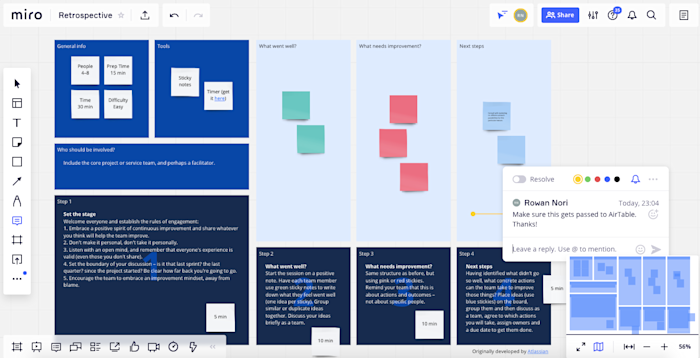
Miro Interface.

Miro is available on any device—and on the web. To get started, choose from a long list of templates (e.g., UX design, customer mapping, and retrospective), or just start with a standard blank whiteboard. And you're not limited to one template: you can add as many as you want to a board, using zoom and scroll to navigate through the various templates on the board. Then add shapes, text, and sticky notes (drag-and-drop) as needed.

If you find yourself looking for more features, go to the Miro marketplace, which houses a list of apps you can integrate, allowing you to do things like update Miro cards within your Airtable base, or add a voting plugin that lets each user vote on designated objects.

Miro is built for more than just brainstorming. It also includes a set of features that supports managers who have to guide the process from ideation to implementation. With Miro, you can monitor what changes have been made, assign tasks, and carry on conversations with team members from within the interface. If you want to present the results of your ideation, you'll love how easy it is to select and drag a portion of the board to create "frames," so you can pan through the board in a more organized manner during presentations. (You can also just turn on the screen sharing mode so that all participants can see your screen while hearing your voice over the audio system.)

You can do even more with Miro by using Miro's Zapier integrations. Automatically create a card on a board in Miro whenever you have a new task, entry in a spreadsheet, or form submission.

Create Miro widgets with new Trello cards
Add Miro cards from new rows on Google Sheets
Create Miro cards when new Typeform entries are submitted
See more Miro integrations powered by

Miro pricing: Free for three editable boards; from $8/month per member for the Team plan that includes unlimited boards and integrations with Jira and Asana.

Best online whiteboard for creating multiple boards in a single brainstorming session

Stormboard (Web, iOS, Android)

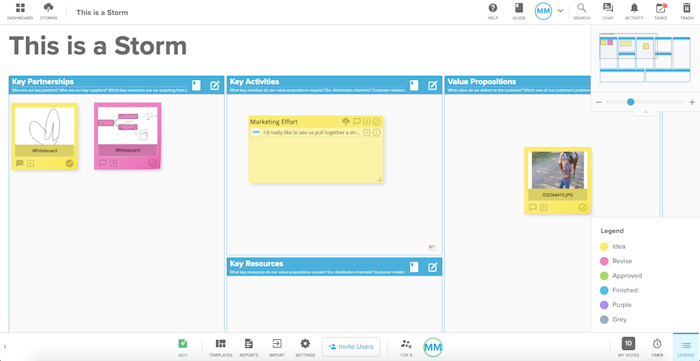
Stormboard interface

At first glance, Stormboard is a sticky-note-style ideation tool. But each digital sticky note can house its own whiteboard, opening up a world of opportunity for big picture brainstorming and collaboration. As soon as you create a new Storm (brainstorming board), you can start adding your ideas. Any sticky note can then turn into a collaborative whiteboard that all collaborators can view and edit in real time.

Using Stormboard solves one of the major problems in any brainstorming or collaborative meeting: how to save each iteration so that it's easy to review and revise moving forward. To organize, drag each whiteboard note around the board with your mouse. Board collaborators can then vote on each board, carry on a text chat conversation, and even assign tasks.

Because Stormboard integrates with Zapier, you can even automate your whiteboarding, creating new Storms or ideas based on activity in other apps. Or you can automatically send your ideas, comments, and tasks from Stormboard to other apps.

Create Stormboard ideas from new inbound emails
Create Stormboard ideas for new Trello cards
See more Stormboard integrations powered by

Stormboard pricing: Free for the Personal account that includes five open Storms and five collaborators per Storm; from $10/month for the Business plan that includes unlimited open Storms.

Best online whiteboard for remote, multi-member team meetings

MURAL (Web, Windows, macOS, iOS, Android)

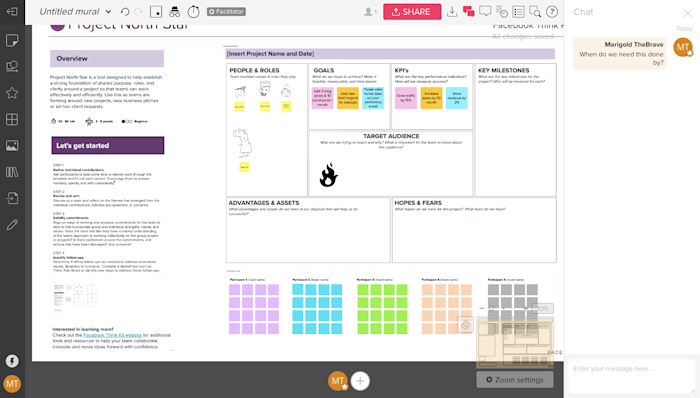
MURAL Interface.

The MURAL canvas can house multiple whiteboard areas, similar to Photoshop artboards, that you can rearrange and resize as needed. On each whiteboard, you can go with the standard blank white background, or choose from a variety of templates to add pre-built grids and content boxes for some additional structure.

MURAL is particularly strong as a team tool, letting you create multiple "rooms" for your whiteboards, each with different permissions to limit access. You might have one room for your design team, one for your marketing team, and so on. You could also create rooms that correspond to various projects.

Remote teams who use MURAL for meetings (like Zapier) will love the digital version of some office staples, from timers (which you can use for focused ideation sprints) to chat boxes. It can be tough to share candid feedback in remote team meetings. That's why we love MURAL's timed voting session, where you can allot a number of votes to each collaborator. To vote, click on an object on your whiteboard. Every vote is anonymous and tallied automatically.

MURAL also integrates with Zapier, letting you do things like automatically create new tasks in your project management tool based on your whiteboards or create new MURAL stickies based on form submissions.

Create Asana tasks from new MURAL stickies
Create MURAL stickies from new Google Form entries
See more MURAL integrations powered by

MURAL pricing: From $12/month for the Starter plan.

If your team wants to move entirely to digital whiteboard solutions, other strong contenders include Microsoft Whiteboard for Office users and Google's Jamboard, a physical whiteboard with a digital display.

Best online whiteboard for teaching students remotely

Limnu (Web, Android, iOS)

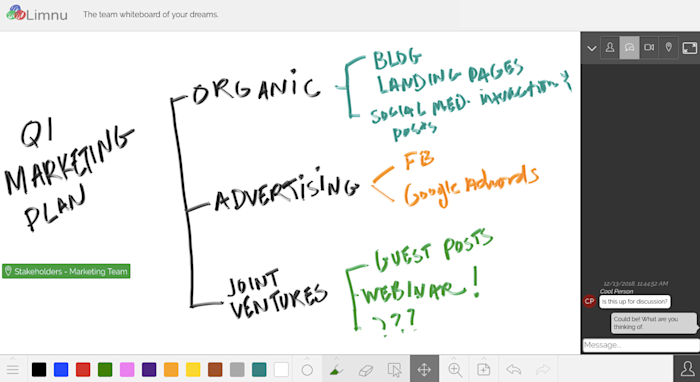
Limnu interface

If you're used to having a physical whiteboard for your presentations and brainstorming sessions and are reluctant to go all-in on digital, you might lean toward Limnu. It feels so much like a real whiteboard that you can almost smell the markers.

But Limnu does a lot more than give realistic marker drawings: it also includes collaboration features that make the jump to teaching online feel much easier. To invite others to view your board, click on the share icon and copy/paste the link. You can even limit their permissions to view-only, if you want. Since your virtual students don't need to go through a lengthy signup process to join your whiteboard, you don't have to worry as much about tech headaches blocking your teaching session.

Limnu pricing: Free plan available; from $5/month for the Pro plan; $8/user/month for the Team plan that includes team boards

Best online whiteboard for annotating design files with a team

InVision Freehand (Web, Android, iOS)

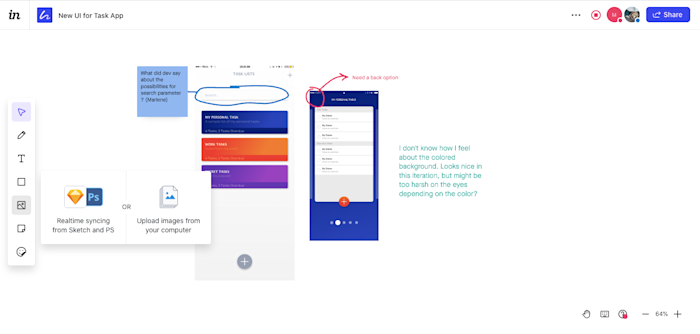
InVision Freehand interface

InVision Freehand gives designers the opportunity to sync their Sketch and Photoshop files and get real-time feedback from teammates and stakeholders. Each logged-in user appears as an icon on the top-right corner of the whiteboard, with a dot indicating the color of the "ink" for their markups. Adding text and uploading files is as simple as a click of the mouse on the top toolbar. 

When the Present option is selected, all collaborators on the board can sit back and watch as the focus stays on your own cursor. The downside: Freehand doesn't include any group chat tools, though you can communicate through comments. You'll have to have another app lined up for visual, audio, or text communication outside of the board drawing.

InVision Freehand pricing: Free plan available for unlimited freehands; from $7.95/month for the Pro plan.

Best online whiteboard for turning a brainstorming session into a formal presentation

Conceptboard (Web)

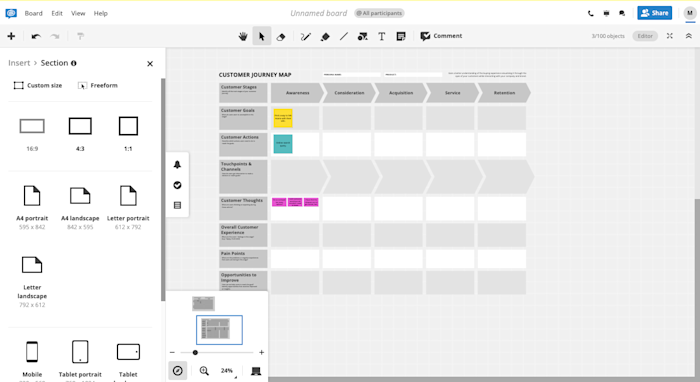
Conceptboard Interface.

Conceptboard is a great choice if you prefer to do your brainstorming and presenting in the same app. The whiteboard itself always starts as a blank slate, but you have the option to add one or more templates to the board. This makes it much easier to cross-reference comments, since you can work on your customer journey mapping alongside your customer persona creation. Collaboration with team members is made easy through chat, board comments, a task system, and even a conference call option. 

When it's time to present the finalized results of your ideation, you can add sections to the whiteboard. Clicking on a given section in the sidebar automatically moves you to that part of the board, so you can jump through a large or complex drawing with ease. Sections can also be exported individually as images or as a group in PDF format, so you can save or share it outside of the app.

Conceptboard pricing: Free for unlimited boards with up to 100 objects and 500MB of storage; from $6.00/month for the Premium plan that includes unlimited objects on boards, 20 GB of storage, and 10 hours of audio, video, and screensharing per user per month. 

Best online whiteboard for creating whiteboard videos

Explain Everything (Web, iOS, Android, ChromeOS)

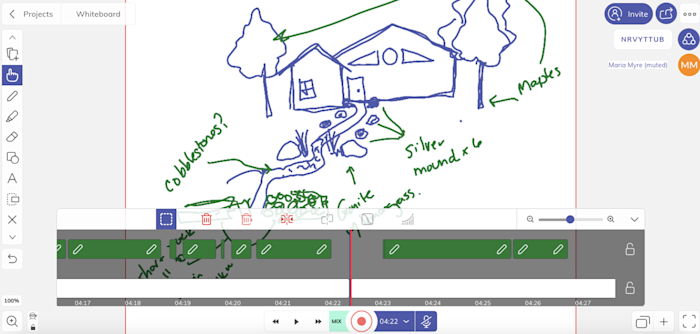
Explain Everything Interface.

As a whiteboard, Explain Everything lets you draw, add text, upload files, and create basic shapes. All fairly standard. But because it offers video recording capabilities, it allows you to record your whiteboard—and voice—as you draw, then edit or split elements to refine the finished video. Once you're satisfied, you can save the video to be shared online as a link or downloaded as an MP4. That way, people who weren't able to attend the whiteboarding session can still get a sense of the process behind it. Or, you can use the whiteboard video as a standalone teaching element for an online classroom. 

Collaboration tools are also built in, so you can invite team members or students to view or edit the board, and converse with them over audio while you're working together.

Explain Everything price: Free for up to three projects with a maximum video length of one minute; from $6.99/month for the Individuals plan with unlimited projects, slides, and unlimited video length.

Which app should I use?

Which online whiteboard you choose depends on how central whiteboarding is to your process, how many collaboration features you need, and whether you need to present your whiteboard material in an online education setting, a stakeholder meeting, or you simply need to save the notes to turn them into tasks later. You'll also need to be sure you pick an app that works on all the platforms you need.

Of course, it's possible that you'll end up using more than one online whiteboard: one for your design team, one for multi-department team meetings, and one for formal presentations. The important thing is to pick a tool that lets you stay focused on keeping clear communication and collaboration at the heart of your work.

BEST WEBSITES/APPS TO BUY BOOKS IS INDIA

  Best Websites To Buy Books In India Buy your favourite book from the top websites in India and enjoy your reading. BY :  ANUSHA   -  32 DA...